RPG Maker MV Scan Lines Plugin
A downloadable project
KYDSGAME Scan Lines
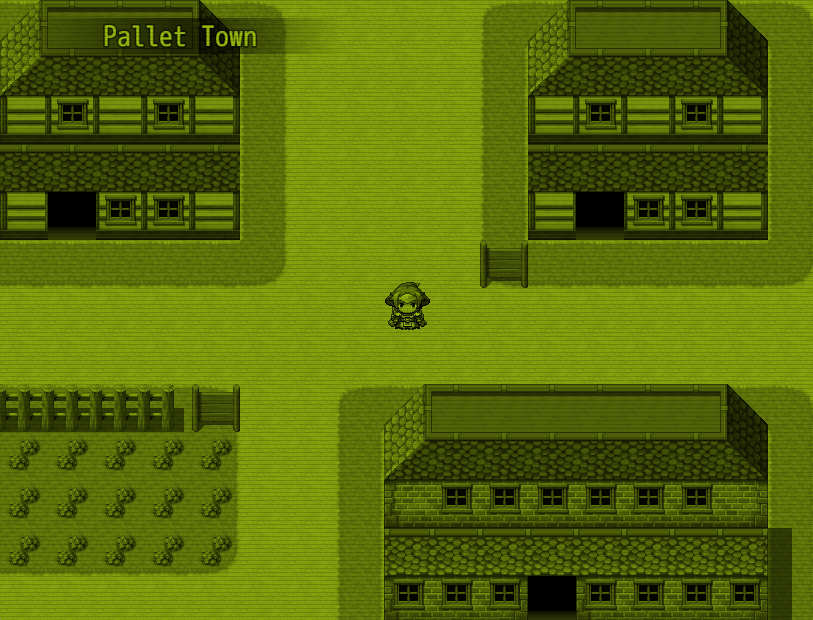
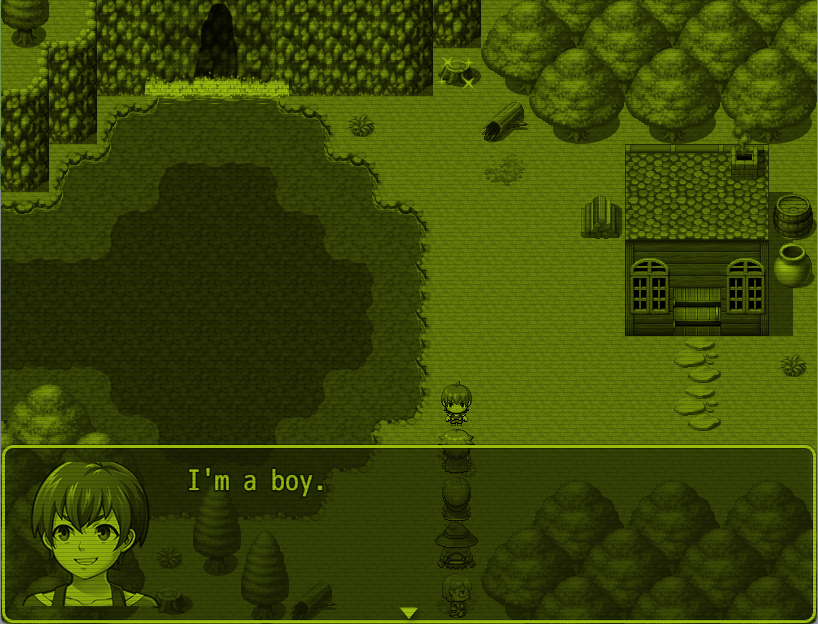
Bring a retro display effect to your RPG Maker MV game.
KYDSGAME Scan Lines is a lightweight visual plugin that adds adjustable horizontal scan lines over your game screen. Create a classic CRT, old monitor, arcade, or retro handheld-inspired appearance without modifying your game's graphics.
The plugin works as a separate visual overlay and is designed to run alongside KYDS Monochrome Palette v1.0.0, allowing you to combine color palettes with scan line effects.
Features
- Horizontal retro scan lines
- Adjustable opacity
- Adjustable line spacing
- Adjustable line thickness
- Enable or disable scan lines during gameplay
- Toggle scan lines with plugin commands
- Change settings at runtime
- Settings persist in save files
- Works independently as a standalone effect
- Compatible with KYDS Monochrome Palette v1.0.0
- Designed for RPG Maker MV
Installation
- Copy
Kyds_ScanLines.jsinto your project's:
js/plugins/
- Open your project in RPG Maker MV.
- Open the Plugin Manager.
- Add:
Kyds_ScanLines
- Turn the plugin ON.
- Adjust the default settings to your preferred visual style.
The scan line effect will be applied automatically if Enabled by Default is set to true.
Plugin Parameters
Enabled by Default
Determines whether scan lines are active when the game starts.
true
or:
false
Opacity
Controls how visible the scan lines are.
0.00 = Invisible
0.15 = Subtle
0.30 = Noticeable
0.50 = Strong
1.00 = Fully opaque
Recommended starting value:
0.15
Line Spacing
Controls the distance between scan lines.
2 = Dense scan lines
4 = Standard retro appearance
6 = Wider spacing
A lower number creates more lines.
A higher number creates fewer lines.
Recommended starting value:
4
Line Thickness
Controls how thick each scan line is.
1 = Thin
2 = Thick
3 = Very thick
Recommended starting value:
1
Plugin Commands
Enable Scan Lines
ScanLines ON
Disable Scan Lines
ScanLines OFF
Toggle Scan Lines
ScanLines TOGGLE
Adjust Opacity
Syntax:
ScanLines Opacity VALUE
Examples:
ScanLines Opacity 0.10
ScanLines Opacity 0.20
ScanLines Opacity 0.35
Adjust Line Spacing
Syntax:
ScanLines Spacing VALUE
Examples:
ScanLines Spacing 2
ScanLines Spacing 4
ScanLines Spacing 6
Adjust Line Thickness
Syntax:
ScanLines Thickness VALUE
Examples:
ScanLines Thickness 1
ScanLines Thickness 2
Reset Settings
Restore all runtime settings to the values configured in the Plugin Manager:
ScanLines Reset
Example Presets
Subtle CRT
Opacity: 0.10
Spacing: 4
Thickness: 1
Classic Retro
Opacity: 0.20
Spacing: 3
Thickness: 1
Heavy CRT
Opacity: 0.35
Spacing: 4
Thickness: 2
Dense Display
Opacity: 0.15
Spacing: 2
Thickness: 1
Using KYDS Scan Lines with KYDS Monochrome Palette
KYDS Scan Lines is designed to work alongside KYDS Monochrome Palette.
For example, you can combine:
KYDS Monochrome Palette Preset: GameBoy
with:
KYDS Scan Lines Opacity: 0.15 Spacing: 4 Thickness: 1
This creates a layered retro display effect:
Game Graphics
       ↓
Monochrome Palette
       ↓
Scan Lines
       ↓
Final Screen
The scan line plugin uses a separate PIXI overlay rather than replacing the monochrome filter, helping the two effects operate independently.
Recommended Plugin Order
Other Plugins
KYDS Monochrome Palette
KYDS Scan Lines
Save Game Support
Runtime changes are stored with your save data.
Your scan line settings can persist when:
- Changing maps
- Entering battles
- Leaving battles
- Saving the game
- Loading a save file
Compatibility
Engine: RPG Maker MV
Compatible with:
- KYDS Monochrome Palette v1.0.0
KYDS Scan Lines uses a separate screen overlay and does not replace scene filters, helping avoid conflicts with the monochrome effect.
Credits
Plugin: KYDS Scan Lines
Version: 1.0.0
Author: KYDSGAME
Credit is appreciated when using this plugin in your project.
License
Copyright © 2026 KYDSGAME.
You may use KYDSGAME Scan Lines in both free and commercial RPG Maker MV projects.
You may modify the plugin for use in your own projects.
Please do not redistribute or resell the plugin by itself without permission.
Leave a comment
Log in with itch.io to leave a comment.